Posts

MIcrosft Windows Intune Step by Step #3
Image
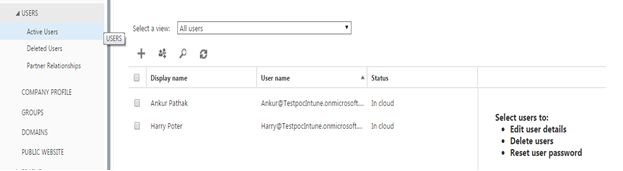
Adding and Managing Users and Groups Note : Only Users can be created only in Account Console and Only Groups can be created in Intune Console Log in to Account console and Go to Users Clicking on + sign, Users can be created and added proving details with roles.  Delete and password reset options are also can be done from here. Global Administrator is a role with full rights and by default user used for subscription will be added and will be having this role. Also Users can be added with different role. Bulk user can be created using CSV file in following format… Creating Groups in Intune Got to : Groups  Right Click : Create Group Provide Group Name and select: Parent Group Select Users Review  Details and Click Finish Created Group can be seen in drop down and added User too Cheers!!!!

MIcrosft Windows Intune Step by Step #2

Image
Exploring Management Consoles There will be 2 management consoles, Which allows you to use various features Account console :   This allows managing users, groups, and domains for Microsoft services which are available online. Provides option to Check the status of your subscriptions, Add new subscriptions and activate new user accounts Admin Console Below Admin pane, Allows you to login in different services/Tools Logging in Intune Click on Intune and log in using credentials  Cheers!!

MIcrosft Windows Intune Step by Step #1

Image
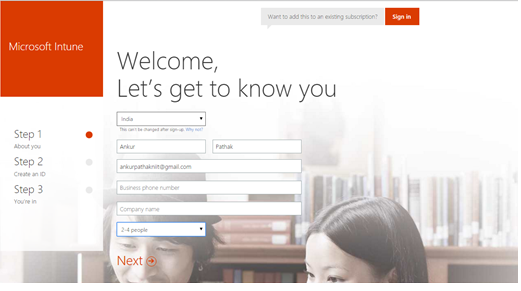
HI Folks , This  post is about Microsoft Intune. I have been hearing about this and thought to give a shot... So what is Windows Intune? Microsoft Intune provides mobile device management, mobile application management, and PC management capabilities from the cloud. Using Intune, organizations can provide their employees with access to corporate applications, data, and resources from virtually anywhere on almost any device, Windows Intune is online service with web console that allows you to manage your clients over the Internet.   Subscription is needed to be taken. It is a mobility solution…. Registration is required in order to use Windows Intune and can be done on below link http://www.microsoft.com/en-us/server-cloud/products/microsoft-intune/default.aspx#fbid=CmV-Y09UnRn 30 days trial is also available from Microsoft Once registration is done, you will be asked to log in to Intune Web Console Cheers!!... ...

Computer’s Model Type from a WMI Query

HI Guys, Recently I was working on OSD and came on a point where i had to apply a specific script/Action/Task Sequence step to specific set of laptops. I achieved this with Computer Model p roperty, Which gives you model information of workstations If You  want to filter driver installs as part of your OSD deployment using a WMI Query and a  SELECT * FROM Win32_ComputerSystem WHERE Model LIKE “%<MODEL>%” statement. To know what your computer model is : run a WMIC command and type in the following command: CSProduct Get Name This will output the model name and you can insert this into your SELECT statement. Cheers!!

Deal with Software deployment 1603 error code

Hi Folks Below link is really helpful for dealing with 1603 error code so thought to share…. https://support.microsoft.com/en-us/kb/834484 Following also could be the possible causes 1 .        Presence of higher version of same application. 2.        Specific installation sequence is required for Application and Prerequisites. 3.        Windows installer service is corrupted. In this case unregister windows installer service and register back. 4.        Higher Windows installer version is required, at least should be 3.0 or Higher. 5.        Insufficient access permissions . Cheers.....

SCCM Software Update Deployment flow

The SCCM clients receive their SUP/WSUS settings as a local policy on the clients, Scan gets initiated as per configured schedule and happens on base of update GUID. Location services looks for our nearest SUP. This also can be checked in windowsupdate.log When scan is completed. ScanAgent reports that the scan is complete and records the results of the scan in the updatestore. Information can be checked in updatestore.log Client sends result of scan cycle through status massages with topic ID 501 and 500 to MP and site server for each the update that are missing on machine. This can be checked in statemassage.log Once all this process completes updates evaluation gets start by receiving policy for applicable updates. Scan gets initiated for to have latest scan data update applicability and report status, This information can be checked in updatedeployment.log Client Retrieve needed update components through CIAssignment and then SDM agent checks what binaries ar...

Managing Linux and Unix Systems using SCCM 2012

Image
Hi Guys... Microsoft has added support for linux and unix systems from SCCM 2012 SP1. You can easily manage supported linux & unix operating system from SCCM. You can use collections as same way you use collections to manage to other clients.Supports both direct membership and query based type. Respective Client packages are available at below link http://www.microsoft.com/en-in/download/details.aspx?id=39360 Supported UNIX/Linux Client: ·          AIX Version 7.1, 6.1, 5.3 ·          Solaris Version 11, 10, 9 ·          HP-UX Version 11iv2 , 11iv3 ·          RHEL Version 6 , 5, 4 ·          SLES Version 11, 10, 9 ·          CentOS Version 6, 5 ·          Debian Ver...