Posts

Creating Multiple DNS Records

Hi Guys, Now from below command you can create multiple DNS records (A and PTR ) at same time 1.        Create a CSV file as Shown below example and Save the file on C:\ 2.        Run below command in PowerShell as administrator name ip type zone dnsserver test 10.192.10.20    A test.com FQDN of DNS Server Import-CSV -Path "c:\DNSEntries.csv" | ForEach-Object { dnscmd.exe $_ .dnsserver / RecordAdd $_ .zone $_ .name / createPTR $_ .type $_ .IP } You can save it as well in .ps1 format and just hit. This will create both host A and PTR records at same time. Cheers!!

SCCM Global Data , Site Data and File\Database Replications

SCCM Global Data and Site Data Global data . Global data refers to administrator-created objects that replicate to all sites throughout the hierarchy, although secondary sites receive only a subset of global data, as global proxy data. Global data includes software deployments, software updates, collection definitions, and role-based administration security scopes. Administrators can create global data at central administration sites and primary sites. Site data . Site data refers to operational information that Configuration Manager primary sites and the clients that report to primary sites create. Site data replicates to the central administration site but not to other primary sites. Site data includes hardware inventory data, status messages, alerts, and the results of query-based collections. Site data is only viewable at the central administration site and at the primary site where the data originates. Site data can be modified only at the primary site where it was ...

Powershell : Small lines and Powerful Output - 2

Image
As we discussed about Powershell and its importance in my previous post http://ankurpathakniit.blogspot.com/2018/03/powershell-small-lines-and-powerful.html Lets walk further Powershell also supports all cmd commands, Run commands as well. cool right?  Does Powershell handle multiple actions in one go ? ...Yes example : Start\Stop  multiple services on local\remote systems Copy\Delete  multiple files\folders on local\remote systems Change application configurations on local\remote systems ...and many more ... Powershell in action We'll try to stop 2 services at same time and following is command for that Net Stop  Service Name (CMD command) Stop-Service Service Name ( Powershell command) We'll try to stop Windows Installer Service alone and then  Windows time  and Installer both in one go. To find Service name select service and see properties Now open Powershell and run our cmd and powershell commands one by one, to Sto...

Powershell small lines and Powerful Output

Image
Guys , as the name says , Powershell is a very powerful command line interface\tool\software to perform all task what you can do in GUI. Just that ? No, i would say it's a language which can allow you to make your own apps\scripst to full fill your requirement. So what actions Powershell can do ? Pretty much ..everything...so what it needs ? Just logic and knowledge of Powershell commands and Syntax ... how? alright.. In Powershell :   Get is almost for fetching information\details and Set is almost for making changes to those details. Examples ... Get-command gives you all default  available commands Similarly you can find so many commands from the output and will come to know about more info with this single command. This includes commands for Set example as well. you really need to see the output. Finding more commands i will left with you guys and in next post will go for some advance info. Cheers!!!!!

Remote Desktop issue, does not work after disabling TLS 1.0\1.1.

Hi Guys, This is about Remote Desktop issue, does not work after disabling TLS 1.0\1.1. For Server 2008 R2, MS has released a patch KB3080079 (There same one more  For Server 2012 R2) to fix this issue but we have seen still some servers does not connect after installing this patch. Following actions can be taken further to resolve issue and found working. I tested it on my VDI. Download and install KB2574819 (https://support.microsoft.com/en-us/kb/2574819) (for source pc from where you are trying to take remote, in my case I downloaded for my VDI - windows 7 X64) Reboot the computer. Download and install KB2592687 (https://support.microsoft.com/en-us/kb/2592687(for source pc from where you are trying to take remote, in my case I downloaded for my VDI - windows 7 X64) Reboot the computer. And it did the trick!! Cheers!!!!

Steps To Protect Against Ransomware Attacks

Wanna cry ransomewayer virus  encrypts files and ask users to pay ransom best practices for  against ransomware keep your security software up to date to protect yourself against them. Disable  SMB 1.0 Keep your operating system and other software updated. FOR Windows based systems apply MS17-010 Email is one of the main infection methods. Be cautious  of unexpected emails especially if they contain links and  attachments. Back up important data In VMware environment, take VM snapshots of healthy systems and export them to SAN\NAS Storage as alternate recovery solution.

SCUP 2011 : Failed to Publish Software Update

Image
Hey Guys, I just recently faced an issue when I was publishing Adobe flash player update using SCUP 2011. Following was error in SCUP.log Download file: https://fpdownload.macromedia.com/pub/flashplayer/pdc/20.0.0.286/install_flash_player_20_active_x.msi failed with message "The underlying connection was closed: Could not establish trust relationship for the SSL/TLS secure channel." PublishItem: Download Content: Failed to download file 'https://fpdownload.macromedia.com/pub/flashplayer/pdc/20.0.0.286/install_flash_player_20_active_x.msi'. As error states that there is a connection and download issue…. Checked download settings….. was ok Checked Firewall settings…… was ok Checked Proxy settings…… was ok Copied update’s download URL and tried downloading manually… omg that is also working …. Now what is the issue…. Went to edit the update and removed…….S   J Yeah!!.....changed download url from https://fpdownload.macr...

Digging SCCM SQL Database : SCCM Database Tables and Columns

Image
I have been always struggling to get desired data from SCCM and it's a really hard job. At least for me J Following query resolved my all problem of searching information SELECT * FROM INFORMATION_SCHEMA.Columns  This gives you all SCCM sql tables information with their columns detail. Now you know what is where …. Cheers……

SCCM SQL Views Types

Hi Folks, This time We'll talk about SCCM SQL Views. What is SCCM SQL Views? SCCM SQL Views is part of SCCM SQL Database and contain information about all SCCM components like Resources, Collections, Updates, All Packages ...everything...... Hence provide option to fetch custom data or create custom reports. Following are types of   SCCM SQL Views and contains information in categories..... V_*                 : default view V_R_  *          : It will fill the values with Discovery data V_RA_  *        :  It will, fill the values Once Discovered and Assigned V_GS_*         :  HINV/SINV/Software Granular data- Present/Current inv data V_HS_*          : Historical data after 90 days - Task maintenance data HINV/SINV/Software V_AI_*          : Asset Intelligence rela...

MIcrosft Windows Intune Step by Step #5

Enrolling and managing Devices You can use Intune to manage desktops, laptops, and other devices running Windows as mobile devices. Use Microsoft Intune to manage computers running supported operating systems using the Intune computer client software. Windows Vista or later is supported ( Domain-joined/Workgroup ) computers. Install the Intune computer client The first step in managing computers with Intune is to install the client. The client software can be installed when a computer is enrolled into management by the Intune service in one of the following ways: ·          Manually deploy the Microsoft Intune client software. an administrator downloads the Intune client software and manually installs it on each system. To download the Intune client software, open the Intune administration console and, in the Client Software Download area, download the client software package. After the client software is ...

MIcrosft Windows Intune Step by Step #4

Image
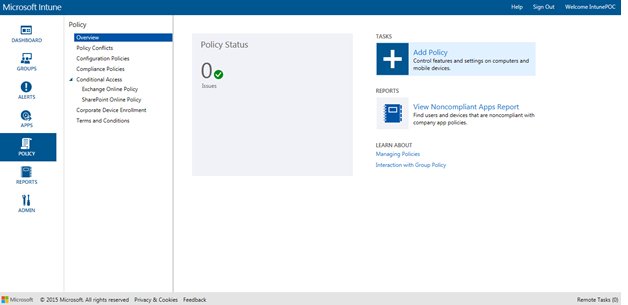
Adding and Managing Policies Click: Add Policy Following number of policies you can create Select as per requirement For ex. : Here I am selecting windows firewall policy Select Template: You can select recommended setting or Custom one Click: Create Policy Window will prompt you to select computers to deploy this policy Select Computers and click ADD Once Done, Deployed Policies can be located in Configuration Policies Cheers……

MIcrosft Windows Intune Step by Step #3

Image
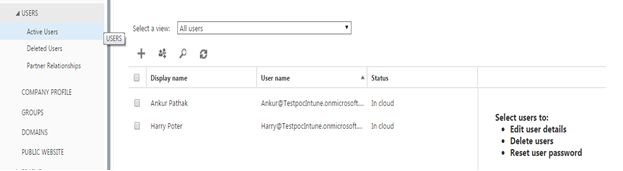
Adding and Managing Users and Groups Note : Only Users can be created only in Account Console and Only Groups can be created in Intune Console Log in to Account console and Go to Users Clicking on + sign, Users can be created and added proving details with roles.  Delete and password reset options are also can be done from here. Global Administrator is a role with full rights and by default user used for subscription will be added and will be having this role. Also Users can be added with different role. Bulk user can be created using CSV file in following format… Creating Groups in Intune Got to : Groups  Right Click : Create Group Provide Group Name and select: Parent Group Select Users Review  Details and Click Finish Created Group can be seen in drop down and added User too Cheers!!!!

MIcrosft Windows Intune Step by Step #2

Image
Exploring Management Consoles There will be 2 management consoles, Which allows you to use various features Account console :   This allows managing users, groups, and domains for Microsoft services which are available online. Provides option to Check the status of your subscriptions, Add new subscriptions and activate new user accounts Admin Console Below Admin pane, Allows you to login in different services/Tools Logging in Intune Click on Intune and log in using credentials  Cheers!!

MIcrosft Windows Intune Step by Step #1

Image
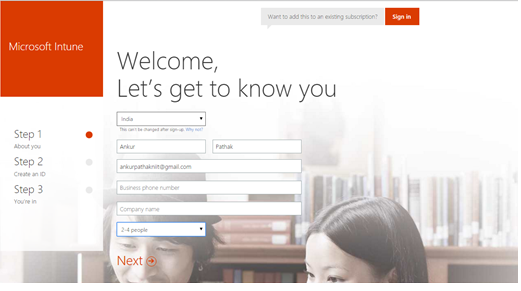
HI Folks , This  post is about Microsoft Intune. I have been hearing about this and thought to give a shot... So what is Windows Intune? Microsoft Intune provides mobile device management, mobile application management, and PC management capabilities from the cloud. Using Intune, organizations can provide their employees with access to corporate applications, data, and resources from virtually anywhere on almost any device, Windows Intune is online service with web console that allows you to manage your clients over the Internet.   Subscription is needed to be taken. It is a mobility solution…. Registration is required in order to use Windows Intune and can be done on below link http://www.microsoft.com/en-us/server-cloud/products/microsoft-intune/default.aspx#fbid=CmV-Y09UnRn 30 days trial is also available from Microsoft Once registration is done, you will be asked to log in to Intune Web Console Cheers!!... ...